03-09-2022 05:26 PM
Optimizations that Samsung needs to do!
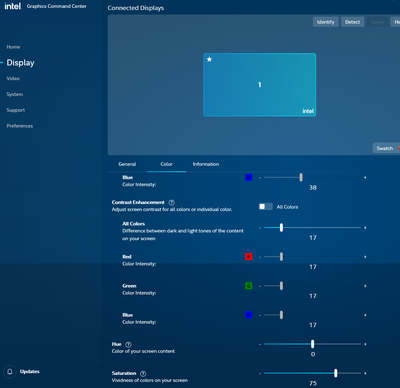
1. The book2 pro 13.3 lacked color and looked "dead" when I got the laptop and took me some time to figure out the issue was saturation, not brightness or color. On the Intel graphics controlcenter app, go to color and turn up the saturation to between 70-80%. 74-75% is the sweetspot. Samsung, make this standard!
2. If the color depth on the intel graphics controlcenter app is changed to 10bits instead of 8bits, there will be issues with the screen when plugging in the charger when the laptop is turned on (looks like 1980s computer screen). When laptop is turned off and plugging in charger, then turning on laptop, the issue is gone until unplugging and then plugging again while laptop is on. I want my 10bits!

06-09-2022 08:49 AM
Wow thank you a great tip, i was getting frustrated with "dead" look, your tweak worked .
Samsung Owner since 2006 | Community Member since 2012 | Instagram: Obsydian_SMS

06-09-2022 08:50 AM
I also changed the Auto Brightness and Contrast settings on.
Samsung Owner since 2006 | Community Member since 2012 | Instagram: Obsydian_SMS